Help fix wonky cellpadding
May. 23rd, 2006 09:42 pm![[personal profile]](https://www.dreamwidth.org/img/silk/identity/user.png) vaneramos
vaneramosFirst of all I have an HTML question. In order to comply with Flickr "Terms of Service" I am incorporating a link back to the site with each photo. However I want grey borders instead of the colours otherwise associated with links. To do this, I set the photo border to "0" and enclosed it in a single-cell table with cell padding 5, and table background colour set to grey. Can anyone tell me why the bottom padding ends up wider than 5 pixels, and how to fix it? I've experimented with vertical alignment of the "td style", and tried setting the table height to 10 pixels more than the photo, but to no avail.
Feeling tired from the weekend, but managed to go for a nature walk with Mina. We went out Lilac Way and found the lilacs at their peak. I had heard those trails ran as far as Eden Mills, a few kilometres distant, and she confirmed she rode all the way some years ago.
Feeling tired from the weekend, but managed to go for a nature walk with Mina. We went out Lilac Way and found the lilacs at their peak. I had heard those trails ran as far as Eden Mills, a few kilometres distant, and she confirmed she rode all the way some years ago.
I tend to get caught up in the big picture, so it's nice to go walking with someone who notices little things, the kind of things I like to photograph. So while I snapped photos, she would say, "Oh look at this." It worked nicely. My daughters make good teammates in the same way.
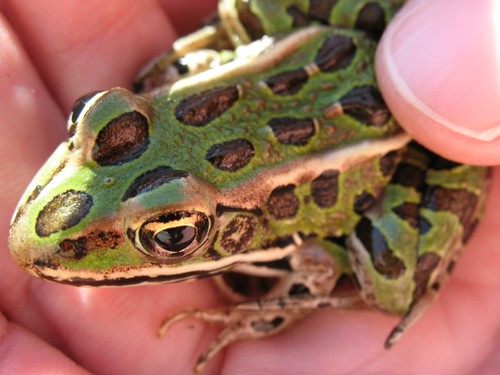
I spotted the hopping leopard frog in a meadow near the Eramosa River, but the buprestid beetle was Mina's find. At least I think that's what it is. These are also known as jewel beetles, because some tropical species are actually incorporated into jewellery. This specimen isn't as showy, but still striking in its own way. It is barely larger than the head of a pin.
I came home with a blowsy, fragrant bouquet of lilacs for the living room.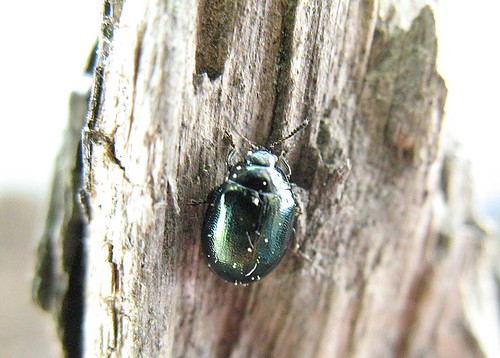


![[identity profile]](https://www.dreamwidth.org/img/silk/identity/openid.png)
no subject
Date: 2006-05-24 02:46 am (UTC)I'd do things as much inline placement as I could.
For example, in this entry, you coded this:
I totally wouldn't do that. Rather than laying things out as a table, I'd simply create the three objects fully formatted unto themselves. The third picture would be coded like this, then:
It won't materially change how the object looks, and the border will be even all the way around the picture.
If I add a "margin" argument to the style part of the tag, I can control the space around the photo without all the odd pixels associated with the table. margin-left, margin-right, so forth and so on. You can set things up with a bubble of however many pixels. Look at my code for this page to see how I work it with margins and borders instead of tables.
no subject
It sounds totally harsh when I say it like that, and I need to apologize for sounding so bloody condescending.
I'm sorry.
no subject
Date: 2006-05-24 03:33 am (UTC)no subject
Try CSS.
Date: 2006-05-24 02:50 am (UTC)<a href="http://whatever it is" style="border-width: 5px; border-color: grey"><img src="http://whatever it is" height="##px" width="##px" alt="My Picture"></a>
where the links and sizes are, of course, filled in with the appropriate values. I think defining the style directly on the link element overrides the ordinary link properties. It may make a difference what browser you use too.
Re: Try CSS.
Date: 2006-05-25 02:21 am (UTC)no subject
Date: 2006-05-24 04:44 am (UTC)no subject
Date: 2006-05-25 02:21 am (UTC)no subject
Date: 2006-05-24 04:57 am (UTC)no subject
Date: 2006-05-25 02:22 am (UTC)no subject
Date: 2006-05-24 10:38 am (UTC)no subject
Date: 2006-05-25 02:23 am (UTC)Blog Guelph
Date: 2006-05-24 04:45 pm (UTC)Sue Richards
no subject
Date: 2006-05-24 07:59 pm (UTC)no subject
Date: 2006-05-25 02:28 am (UTC)BTW our spring concert will be a week from Saturday. We're also doing one on Friday night at Parkminster United in Waterloo (the church where we did the wedding last fall). Drop a line if you're interested in coming.